Powered by Zen IQ AI

Property management that runs itself.

Zen Communities connects operations, residents, finance and intelligence in one platform - so your team spends less time chasing tasks and more time improving the communities you manage.
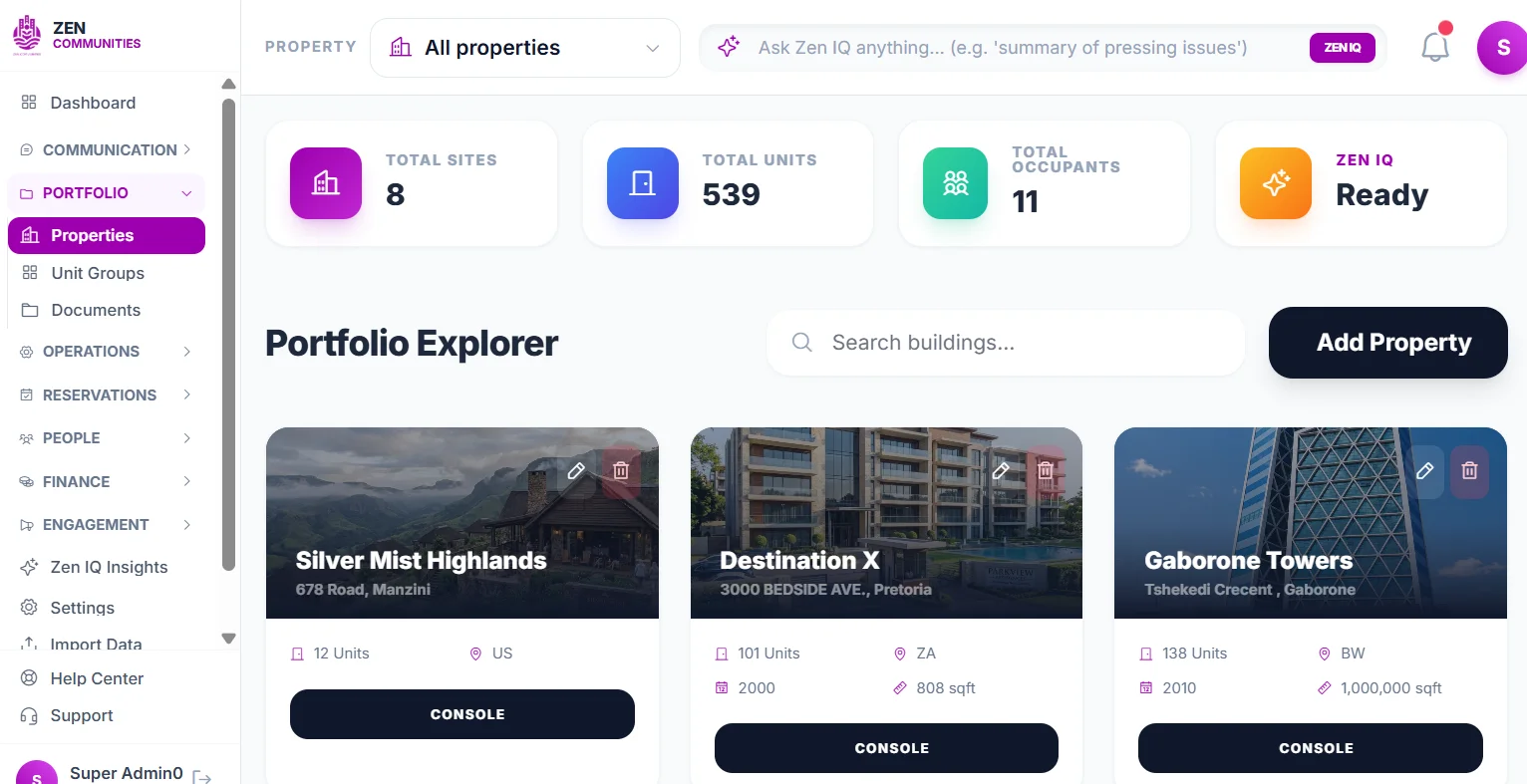
✓ Residential & HOA ✓ Student & hospitality ✓ Commercial portfolios
Zen Communities portfolio explorer
↗Rent reminder sentOccupant notified automatically
⚙Work order predictedHVAC service due in 12 days
Built as one connected platform

Four layers. One operating system.

Zen connects the operational, data, intelligence and financial layers of property management - so information does not get trapped between departments or tools.

One systemMaintenance, leasing, communication, staff, residents, governance and finance work together instead of living in separate applications.Connected operations
One data layerA unit, occupant, vendor or asset is recorded once and reused across workflows - reducing duplicate entry and conflicting records.Single source of truth
One AI brainZen IQ can see signals across workflows - helping automate reminders, summarize activity, identify risk and surface what needs attention.Intelligence everywhere
One ledgerOperational transactions flow into Zen Books so payments, charges, vendor costs and reconciliations stay connected to the activity that created them.Finance in context
One action can update operations, records, intelligence and accounting at the same time.
See the outcome, not just the feature

From manual follow-up to automated flow.

Every major Zen workflow is designed around the same idea: capture a signal once, automate the repetitive work, keep humans in control, and sync the financial impact automatically.

Rent collection without the chasing

Zen turns the monthly rent cycle into a predictable automated journey - from invoice creation through reminders, payment and reconciliation.

✓Automatic invoices based on unit, lease and billing rules.
✓Smart reminders through supported communication channels.
✓Payment status updates the occupant, unit and finance record.
Rent collection journeyAutomated workflow
Rent invoiceGenerated from lease and unit
ReminderPush - email - SMS - WhatsApp
Occupant paysMobile or web payment
Funds receivedPayment reaches collection account
Zen BooksTransaction posts automatically
Payment status decision
PAID
Auto-reconcileUnit balance and ledger update
↔
NOT PAID
Reminder cycle repeatsEscalate based on rules
No spreadsheet follow-up - unpaid accounts automatically remain in the reminder workflow until resolved.
Invoice → reminder → resident payment → bank → Zen Books → automatic reconciliation, with unpaid balances looping back into reminders.
OutcomeLess chasing. Faster collections. Automatic reconciliation. A continuously current ledger.

A maintenance request becomes a managed job

Residents can report an issue with context, images and location. Zen turns that request into an accountable workflow from triage to vendor completion.

✓Requests stay tied to the occupant, unit and property.
✓Staff and vendors see one shared status trail.
✓Costs can flow directly to finance once approved.
Maintenance request to paid invoicePaperless workflow
Resident requestIssue + photos submitted in app
Zen CommunitiesRequest logged against unit
TriagePriority + trade + history
Who should perform the work?
IN-HOUSE
Maintenance staffAssign directly as work order
OR
EXTERNAL
Vendor RFPInvite quotes → award vendor
Work orderAwarded RFP becomes work order
Work completedPhotos + notes + resident status
InvoiceApproved against work order
Vendor paidPayment approval + settlement
Zen BooksExpense + vendor record + property ledger
Paper requestManual RFPSeparate invoice logReplaced by one digital trail
OutcomeThe resident creates the request once - Zen carries it through assignment, RFP, work order, invoice, payment and accounting without duplicate paperwork.

Prevent breakdowns before residents feel them

Recurring maintenance plans turn asset care into a calendar-driven operating rhythm instead of a memory-based process.

Preventative maintenance cycleRuns ahead of failure
Asset registerHVAC - pumps - lifts - generators
Service intervalCalendar and recurring rules
Zen IQ due signalPrioritizes what needs attention
Auto work orderChecklist + due date + assignee
Service performedStaff or approved vendor
Evidence capturedChecklist - photos - readings
Asset history updatedCost and service record retained
Next cycle scheduledNo diary or memory required
The completed service automatically becomes the starting point for the next preventative cycle.
OutcomeFewer emergencies. Better asset history. More predictable maintenance costs.

Maintenance gets smarter as the portfolio learns

Predictive maintenance connects recurring failures, service history and operational patterns so Zen IQ can surface risk before a breakdown becomes obvious.

Predictive maintenance intelligencePattern detection
Maintenance historyRepeat work orders + cost
Asset dataAge - type - service pattern
Zen IQ risk modelDetect abnormal frequency and cost
Risk threshold
HIGH RISK
Flag assetRecommend inspection or early service
Inspect nowConfirm repair vs replacement
OR
NORMAL
Keep monitoringContinue learning from new data
Repair or replaceManager chooses with cost context
Cost recordedApproved operational expense
Zen BooksLifecycle cost becomes visible
OutcomeMaintenance changes from “what broke?” to “what is likely to fail next?”

From listing to occupied unit in one connected journey

Zen keeps the public listing, application, approval, lease, deposit, inspection and occupant record connected instead of splitting them across systems.

Listing to occupied unitNo re-keying
Available unitPublished on property website
Online applicationApplicant submits details + documents
Review summaryZen IQ organizes exceptions
Approve + leaseLease tied to unit and occupant
Move-in inspectionChecklist + photos + condition
Deposit + first rentPayment recorded
Zen BooksDeposit + receivable + payment
Occupant profileAccess - documents - billing - notices
The applicant record becomes the occupant record - the same data follows the person through leasing, inspection, billing and community access.
OutcomeNo re-keying. One applicant record becomes the lease, occupant, billing and move-in record.

Fair, documented covenant enforcement in the field

Violations move from mobile capture to evidence, notices, escalation and payment while preserving a consistent audit trail.

Violation to resolutionDocumented enforcement
Field capturePhoto + unit + rule + notes
Case createdEvidence and history attached
Zen IQ assistsStage + template + prior history
Notice deliveredDigital and postal sequence
Was the violation cured by deadline?
YES
Close caseResolution retained in history
OR
NO
EscalateNext notice / hearing / fee
Fine or chargeResident balance updates
PaymentResident resolves charge
Zen BooksPayment and receivable reconcile
Case history completeFull audit trail retained
OutcomeConsistent enforcement. Defensible documentation. Less administrative overhead.

One message can reach the right people automatically

Communication is one of the most important workflows in Zen. Managers can target a property, role, unit group, user group or individual and deliver the message through the right channel while preserving a communication record.

Push notificationsEmailSMSWhatsApp workflows
Targeted communicationsOne message - multiple channels
Select audienceProperty - role - group - unit - user
Draft + translateZen IQ assists with message
Choose channelsPush - email - SMS - WhatsApp
DeliverResidents receive on preferred channels
Delivery recordTrack status and communication history
Urgent or not delivered?
DELIVERED
Record completeMessage remains in property history
OR
NEEDS FOLLOW-UP
Re-route / remindUse another channel or targeted follow-up
OutcomeBetter reach. Less manual follow-up. A clear record of who was informed.

Staff handovers become structured operational memory

Instead of relying on WhatsApp threads, notebooks or verbal updates, staff can pass down open issues, security notes, resident follow-ups and property tasks to the next shift.

Shift handover and task continuityOperational memory
Outgoing shiftCaptures incidents + open items
Structured passdownTasks linked to unit - user - work order
Zen IQ summaryPrioritizes urgent and overdue items
Incoming shiftReceives concise handover
Work assignedClear owner + due date
End of next shift
COMPLETE
Close itemCompletion visible to manager
OR
OPEN
Carry forwardEscalate or pass to next shift
No notebook, chat thread or verbal handover is required to preserve operational context.
OutcomeClear handovers. Fewer missed tasks. Operational continuity across shifts.
Communication is infrastructure

Reach the right person, at the right time, on the right channel.

Zen connects notifications to the actual property data. A message can be targeted using roles, user groups, unit groups, properties, units or individual users - and the communication becomes part of the operating record.

Targeted communication without rebuilding mailing lists

A property manager can notify only the people affected by a water interruption, only owners about a levy decision, only pet owners about a policy update, or a single occupant about a balance or work order.

AChoose audience

Role, group, unit or person.

AIDraft + translate

Zen IQ helps prepare the message.

CSend channels

Push, email, SMS and supported messaging.

RRetain record

Keep communication history in context.

PushEmailSMSWhatsAppAI translation
Example notification stream
!
Water interruption - Block CSent to occupants in Block C only
Delivered
R
Rent reminder - Unit 3ATriggered from outstanding balance
Automated
M
Maintenance completeOccupant notified after work order closure
Synced
D
New document availableOwners group granted access
Targeted
1 audiencedefined from live Zen data
4 channelsfrom one communication workflow
Native accounting

Operations happen in Zen. The books stay current.

Zen Books is not an afterthought. Rent, fees, approved maintenance costs, deposits and other property transactions can flow from the operational event to the financial record without rebuilding the transaction somewhere else.

Rent & recurring chargesInvoices, receipts and balances
MaintenanceApproved vendor and repair costs
Leasing & depositsMove-in financial activity
Violations & feesCharges, payments and waivers
Zen Bookssingle source of financial truth
Live operational ledger

Accounting without duplicate entry

The event that changes the property can also create the accounting context. Managers retain operational clarity while finance gets a cleaner ledger.

R
Rent received · Unit A-204Occupant account reconciled
Posted
M
Plumbing invoice · WO-1842Approved maintenance expense
Synced
D
Security deposit · Unit C-11Linked to lease lifecycle
Recorded
F
Violation fee · Case VE-109Resident balance updated
Posted
Why it mattersOperational teams and accountants work from the same underlying events instead of reconciling separate realities.
One connected platform

Every module makes the other modules smarter.

Zen is designed as an operating system for the property - not a collection of disconnected tools.

◎

Portfolio & unit management

Keep properties, units, occupants, leases, groups, notes and documents connected from portfolio level to the individual unit.

Property → Unit → Occupant → History
◴

Task management

Assign work to staff with due dates, priorities and links to work orders, units or users - with structured passdowns between shifts.

Task → Owner → Context → Completion
⚙

Maintenance & vendors

Reactive requests, RFPs, vendor workflows, recurring service schedules and AI-assisted maintenance intelligence.

Request → Triage → Work order → Cost
◫

Inspections

Move-in, move-out and custom checklists with item-level photos, review states and security-deposit context.

Checklist → Evidence → Review → Decision
✦

Communication

Push, email, SMS and supported messaging workflows with audience selection by property, role, user group, unit group or individual - plus communication history.

Audience → Message → Delivery → Record
▣

Documents & permissions

Drive-like folders and files with permission controls by role, user group, unit group and individual access.

File → Permission → Audience → Audit
⌂

Leasing automation

Public property pages, listings, applications, lease assignment, renewals, escalations and occupant onboarding.

Listing → Application → Lease → Billing
◉

Rental payments

Recurring charges, statements, reminders, payment records and resident-level financial visibility.

Invoice → Reminder → Payment → Ledger
▤

Zen Books accounting

Native accounting connected to the operational workflows that create revenue, expenses, receivables and liabilities.

Operational event → Journal context → Reports
◇

Amenities & reservations

Let communities manage bookable spaces, availability, rules, approvals and resident reservations.

Availability → Booking → Approval → Access
▧

Parcel concierge

Track incoming packages and connect them to occupants with a clear chain from receipt to pickup.

Receive → Identify → Notify → Collect
⚑

Covenant enforcement

Mobile violation capture, evidence, letter sequences, escalation, delivery tracking, infractions and resolution.

Capture → Notice → Escalate → Resolve
☆

Community hub

Give occupants a digital destination for information, notices, documents, services and engagement.

Community → Content → Interaction → Insight
◌

On-demand property talent

Source property managers and support professionals when a community or portfolio needs temporary capacity.

Need → Match → Work → Weekly payout
⌁

Analytics & reminders

Surface portfolio health, overdue work, financial trends, lease events, escalation dates and action items.

Data → Signal → Reminder → Action
Commercial
Public property websites + digital leasing

Every property gets a website that can turn interest into occupancy.

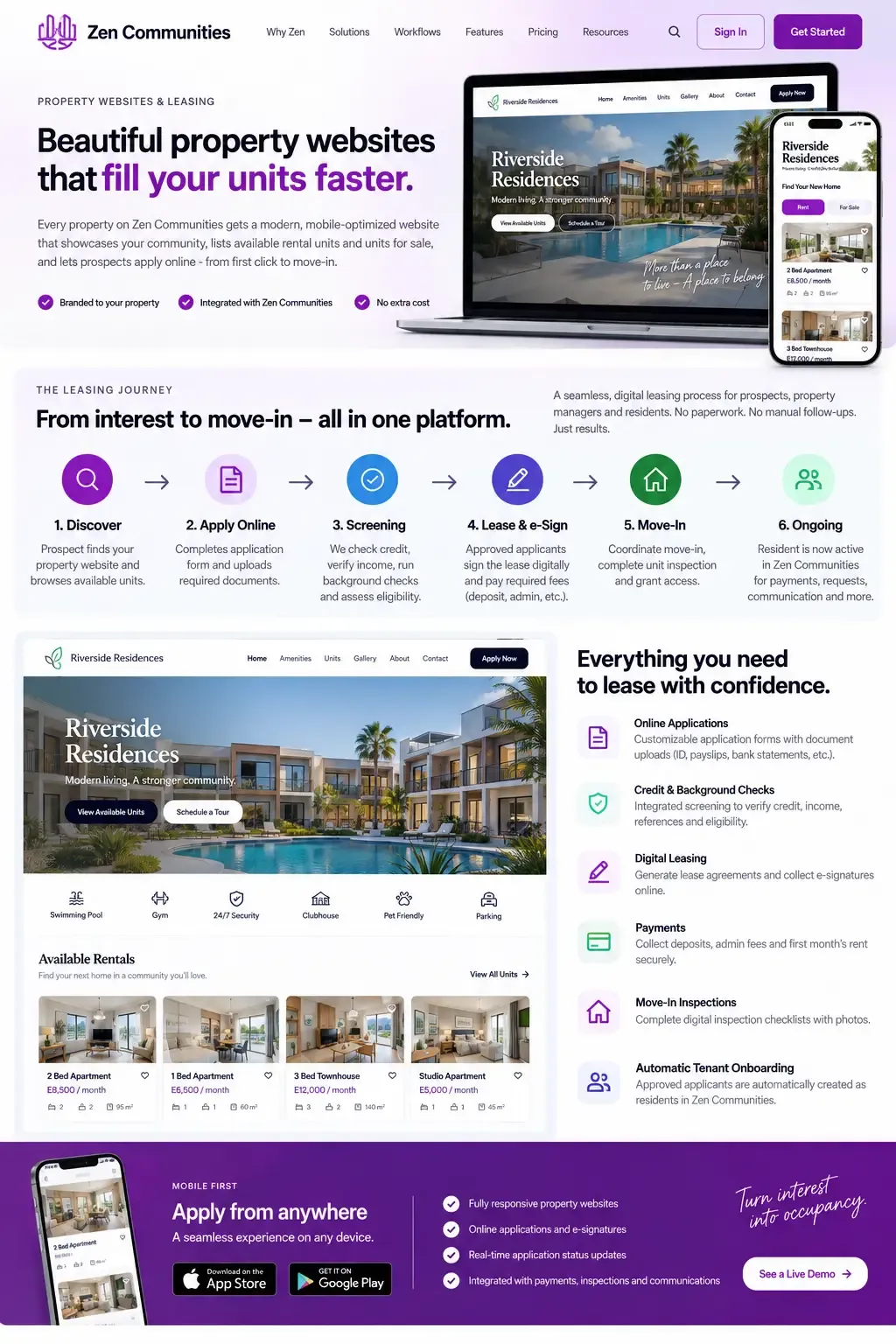
Each property on Zen Communities can have its own public-facing, mobile-ready website with available rental units, units for sale, property details, amenities, galleries and direct enquiry or application flows.
✓
Live rental and for-sale inventoryAvailable units can be published directly from the property and unit records already maintained in Zen.
✓
Apply without leaving the property websiteProspects move from browsing a unit into a guided online application with pre-populated property, rent, deposit and availability information.
✓
Documents, screening and eligibility in one journeyApplicants can upload identification and supporting documents, while configured screening integrations can support credit, income, reference and eligibility checks.
✓
Digital lease + e-signatureApproved applicants can move into lease generation, electronic signing, deposits, fees and required approvals without restarting the process elsewhere.
✓
Move-in inspection becomes part of onboardingInspection checklists, photos, keys or access steps and move-in records stay linked to the same unit and applicant.
✓
Applicant becomes occupant automaticallyOnce the lease is active, the approved applicant can become an occupant in Zen with billing, communications, documents and Community Hub access ready to continue.
Illustrative Zen property websiteMockup of a public property website and digital leasing journey powered by Zen Communities
End-to-end leasing workflow

From “I like this unit” to “I live here now.”

The leasing workflow keeps the prospect, application, screening, lease, payment, inspection and resident record connected. The same data follows the applicant through the entire lifecycle.

1. DiscoverProspect browses rentals or units for sale on the property's public website.
2. Apply onlineApplication, household details and required documents are submitted digitally.
3. Screen + qualifyConfigured integrations support credit, income, references and eligibility review.
4. ApproveManager reviews the complete application and supporting information.
5. Lease + e-signLease documents are generated and electronically signed by the required parties.
6. Collect fundsDeposit, first rent, admin fees and other approved charges can be collected and recorded.
7. Inspect + move inMove-in checklist, photos, condition record and access steps are completed in Zen.
8. Become occupantProfile activates for rent, maintenance, documents, notifications, reservations and Community Hub.
No duplicate data entryThe application becomes the foundation of the resident record.
Fewer disconnected toolsWebsite, leasing, documents, payments, inspections and onboarding stay connected.
Faster leasing decisionsManagers see the application, documents and screening context in one workflow.
Immediate operational continuityOnce occupied, the same user moves naturally into the resident experience.
Context-rich profiles

Every unit and every user has a complete operational story.

Zen brings the records that matter together instead of forcing managers to search separate modules for the same person or unit.

Unit Profile
3A
Unit 3A - Palm CourtOccupied - Lease renewal 30 Nov 2026
Healthy
OccupantsLeaseDocumentsMaintenanceInspectionsFinance
Rent receivedAccount updated and posted to Zen Books
HVAC service completedWork order WO-1842 closed with photos
Lease escalation scheduledAnnual increase saved for next renewal cycle
User Profile
JS
Jordan SmithOccupant - Unit 3A
ContactUnitsNotesDocumentsTransactionsMessages
Maintenance request submittedBathroom leak - linked to Unit 3A
Notification deliveredBuilding access update via push and email
Document acknowledgedUpdated house rules viewed in Community Hub
A resident app people actually use

Community services become part of the daily experience.

Zen is more than back-office software. Residents can interact with the property through a unified Community Hub while management keeps every interaction connected to the same data model.

◇

Reservations

Book amenities, meeting rooms, clubhouses, sports areas and shared spaces with rules, approvals and availability.

Browse → Reserve → Approve → Confirm
▦

Community Hub

One digital home for notices, documents, property information, services and community engagement.

Discover → Engage → Act → Stay informed
⌂

Classifieds

Residents can post items, services and community listings within a property-specific trusted network.

Post → Moderate → Discover → Connect
?

Lost and found

Report found items, search community listings and notify the right audience without broadcasting outside the property.

Report → Match → Notify → Return
▧

Parcel concierge

Packages are logged, occupants are notified and collection is recorded from front desk to resident.

Receive → Notify → Collect → Close
☆

Events and announcements

Publish community events and notices directly into the same resident environment used for payments, reservations and documents.

Publish → Notify → Attend → Follow up
Built for portfolios

See one property. Or see the entire organization.

Zen is designed to work at portfolio level and property level. Organizations can standardize operations across multiple sites while still allowing each property to retain its own users, units, workflows and local context.

Portfolio viewCompare performance across properties
Shared standardsTemplates, roles and workflows scale centrally
Local controlProperty teams manage their own daily operations
Consolidated dataReports roll up without spreadsheet merges
Portfolio command center

From executive view to unit detail in the same system

PPortfolio

Financial health, open work, occupancy, risk and performance.

↓Property

Local teams, buildings, amenities, notices and operational queues.

↓Unit

Lease, occupants, maintenance, inspections, documents and balances.

AIZen IQ across all levels

Signals can be surfaced from a single unit or across the full portfolio.

Reports that explain the portfolio

Operational data becomes management insight.

Reports can bring together rent, maintenance, occupancy, tasks, inspections, lease events and accounting so leaders can see what changed and where attention is needed.

Portfolio performance trendIllustrative dashboard view
Collections94.8%Portfolio rent collection status
Maintenance SLA89%Work orders closed within target
Occupancy96%Current leased unit rate
Overdue tasks12Across staff and properties
Upcoming renewals38Within the next 90 days
Work anywhere

Native mobile apps with offline mode.

Property work does not always happen behind a desk - and connectivity is not guaranteed. Zen supports mobile workflows for Android and iOS, with offline capability for field operations where a connection may be weak or unavailable.

✓Capture inspections, notes, violations and maintenance evidence in the field.
✓Continue supported workflows offline and sync when connectivity returns.
✓Residents receive the same community experience on Android and iOS.
●
Available forAndroid
◆
Available foriOS
● Offline mode active
Inspection - Unit 147 of 12 items completed
Photos saved locallyWill sync when connection returns
Passdown noteSecurity gate motor requires follow-up
✓ Connected
Community HubNotices, reservations, documents and payments
Reservation confirmedClubhouse - Saturday 14:00
Maintenance updateYour work order has been assigned
Financial intelligenceArrears, revenue, escalations, anomalies
Maintenance intelligenceRepeat failures, risk, scheduling
Resident intelligenceContext, reminders, service history
Operational intelligenceTasks, deadlines, bottlenecks
Governance intelligenceViolations, documents, audit history
Zen IQAI across the portfolio
Intelligence in context

AI that can see the whole property story.

The value of Zen IQ is not a chatbot sitting beside your software. It is intelligence connected to the same units, people, payments, maintenance records, tasks and documents your team already works with.

See what needs attentionSurface upcoming deadlines, overdue work, rent exceptions and portfolio risks before they disappear into reports.
Understand patternsConnect repeat maintenance issues, lease events, service histories and financial trends across properties.
Prepare the next actionCreate useful starting points - reminders, work orders, summaries, follow-ups and recommendations - while the manager remains in control.
Learn from one connected data modelA unit is not just a row in a table. It is connected to occupants, documents, transactions, tasks, inspections, work orders and history.

The goal is not to give property managers more software. It is to give them less manual work.

Zen Communities is built around connected workflows: when something happens in one part of the property, the right people, records and financial data can move with it.

Explore the workflows ↑
Bring your portfolio into one operating system

Ready to run your properties with more intelligence and less friction?

Start with the modules you need today, then grow into a connected platform for operations, finance, residents and governance.

Contact Zen Communities

Tell us about your portfolio and priorities.

Share a few details about your organization, the properties you manage and what you want to improve. We will route your enquiry to the right Zen team.

What brings you to Zen?

Tell us about the portfolio

What needs the most improvement?

Where should we follow up?

Zen enquiry summaryYour tailored enquiry summary will appear here as you complete the form.